What is Gravity Forms?
Gravity Forms is a premium form builder plugin for WordPress that lets site owners create contact forms, registrations, surveys, payment forms and more without writing code. It runs inside the WordPress dashboard and stores entries on your own site. The plugin is built by Rocketgenius and is known for flexible conditional logic, a large set of official add-ons and a strong developer ecosystem.
Gravity Forms is sold as a yearly license rather than a hosted subscription. Each license tier unlocks more sites and more add-ons, from basic email marketing connections up to payments, user registration, surveys and webhooks. There is no free version or trial, so it is mainly chosen by agencies, developers and businesses that want a dependable, extendable form tool for client or company websites. Elite also supports WordPress Multisite networks.
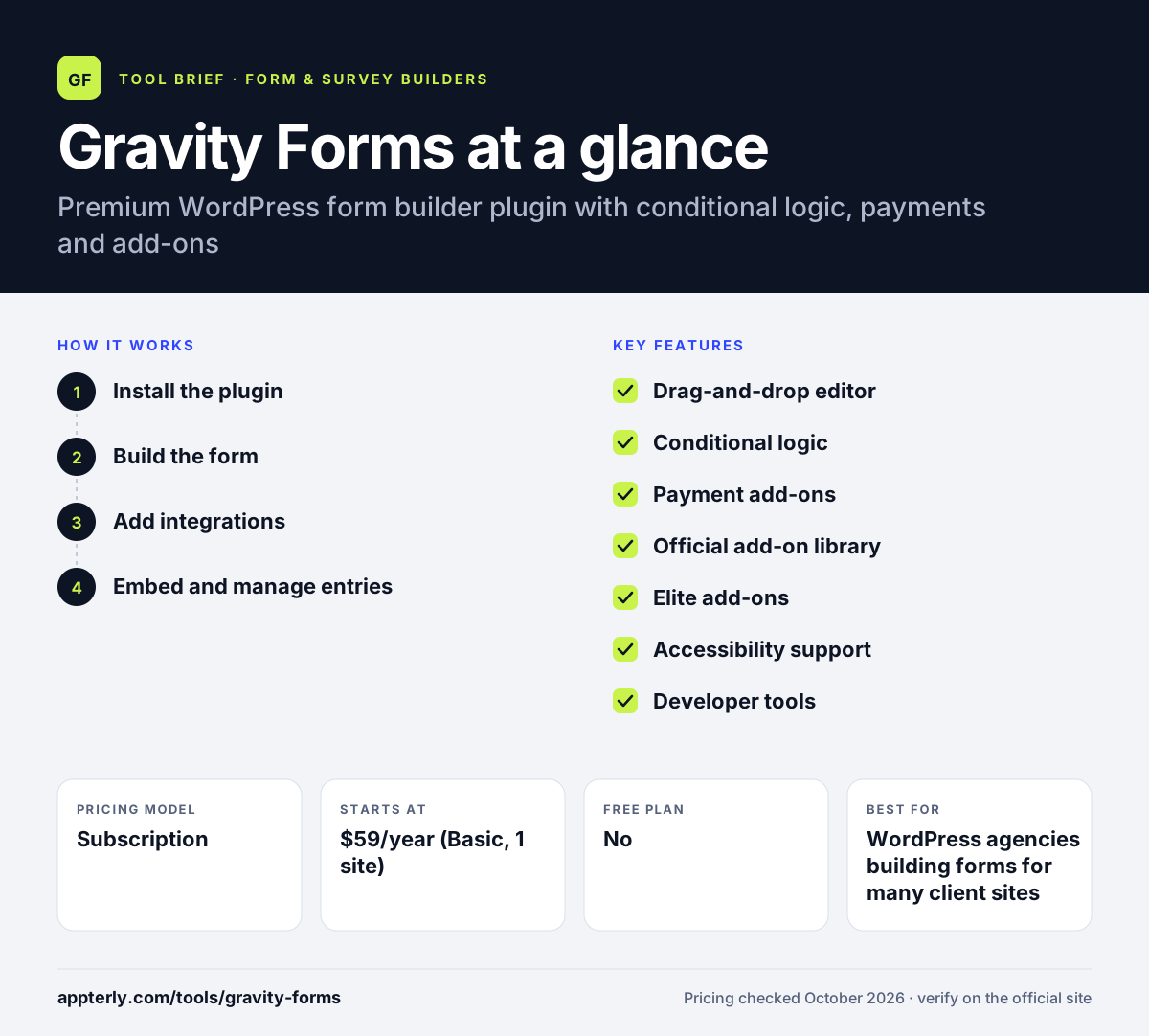
Gravity Forms at a glance
How does Gravity Forms work?
- Install the plugin
Buy a license, upload Gravity Forms to your WordPress site and activate it with your license key. A demo is available if you want to see it first.
- Build the form
Use the drag-and-drop editor to add fields from more than 30 types, or start from a template. Set columns, pages and conditional logic.
- Add integrations
Install official add-ons to connect the form to tools such as Mailchimp, HubSpot, Stripe or Zapier, depending on your license.
- Embed and manage entries
Place the form on any page with a block or shortcode, then review, export and act on entries inside WordPress. Uploaded files are saved directly to your server.
Gravity Forms key features
Drag-and-drop editor
Over 30 field types, templates and column layouts with up to four columns per row.
Conditional logic
Show or hide fields, sections, pages and buttons based on what a visitor enters.
Payment add-ons
Collect one-time payments, subscriptions and donations with PayPal, Stripe, Square, Mollie and Authorize.net. Payment add-ons are part of the Pro and Elite licenses.
Official add-on library
Basic add-ons cover email tools like Mailchimp and ActiveCampaign. Higher tiers add Zapier, Slack, Dropbox, Salesforce and webhooks.
Elite add-ons
User Registration, Conversational Forms, Partial Entries, Polls, Survey and Signature are included with the Elite license.
Accessibility support
Forms can be built to meet WCAG 2.1 AA guidelines.
Developer tools
A command-line tool and an MCP option make Gravity Forms easier to manage and automate for custom projects.
Related products
Gravity SMTP handles WordPress email delivery, and Gravity Flow adds approval workflows built on forms.
Why use Gravity Forms?
- Gravity Forms handles complex forms with multi-page layouts and detailed logic.
- Entries and uploaded files stay on your own WordPress server.
- A mature add-on ecosystem covers payments, CRMs and email marketing.
- Developers can extend and automate the plugin with its CLI and MCP tools.
- One Elite license can cover unlimited client sites for agencies.
Who is Gravity Forms best for?
A good fit for
- WordPress agencies building forms for many client sites
- Developers who need custom form behavior
- Businesses running registrations, applications or payment forms on WordPress
- Membership sites that need user registration
Less suited to
- People without a WordPress site
- Users who want a free plan or a free trial before buying
- Beginners who only need one simple contact form
Gravity Forms pricing
| Pricing model | Subscription |
|---|---|
| Free plan | No |
| Free trial | Not confirmed |
| Starting price | $59/year (Basic, 1 site) |
Basic covers one site, Pro ($159/year) covers three sites and adds Pro add-ons such as Stripe and Zapier, and Elite ($259/year) covers unlimited sites with all add-ons and priority support.
Prices checked October 2026. Vendors change plans often, so confirm on the official Gravity Forms pricing page before you buy.
Gravity Forms pros and cons
Pros
- Powerful conditional logic and multi-page forms
- Large official add-on library
- Data stays on your own site
- Strong developer and agency support
Cons
- No free version or trial
- Many integrations are locked to higher license tiers
- Only works with WordPress
Gravity Forms integrations and platforms
Works with
Available on
Gravity Forms alternatives
See the full shortlist in Best Form Builders.
Gravity Forms FAQ
Is Gravity Forms free?
No. Gravity Forms is a paid WordPress plugin with no free version, and the company says it does not offer a trial, though a demo is available. Licenses are billed yearly, starting at $59 for one site on the Basic plan. Pro costs $159 for three sites and Elite costs $259 for unlimited sites.
What is Gravity Forms used for?
Gravity Forms is used to build forms on WordPress sites, such as contact forms, quote requests, event registrations, job applications, surveys and payment forms. Its add-ons let it send data to email tools and CRMs, collect payments and even register new WordPress users.
Is Gravity Forms good for beginners?
Gravity Forms is usable by beginners thanks to its drag-and-drop editor and templates, but it is aimed at users who want depth. The many settings, add-ons and logic options take time to learn. If you only need one simple contact form, a free plugin may be easier. Templates help with common forms.
Gravity Forms vs WPForms: what's the difference?
Both are WordPress form plugins. WPForms offers a free Lite version and focuses on ease of use with many templates. Gravity Forms has no free version but is often preferred by developers and agencies for its flexible logic, hooks and add-on ecosystem. Gravity Forms also has lower starting license prices than WPForms.
Does Gravity Forms integrate with Zapier?
Yes. Gravity Forms has an official Zapier add-on, which is included with the Pro and Elite licenses. It lets you send form entries to thousands of apps. The plugin also offers direct add-ons for tools such as Mailchimp, HubSpot, Slack, Trello and Salesforce, depending on your license tier.
Sources
This overview is based on Gravity Forms's official website and documentation, checked October 2026.